January 28th, 2014
I just noticed some strange Puppet behaviour. Take a look at this:
class monitoring {
  define nrpe_command (
    $ensure               = present,
    $command,
    $target               = "/etc/nagios/nrpe.d/$title.cfg"
  ) {
    file { $target :
      ensure            => file,
      owner             => root,
      group             => root,
      mode              => 0755,
      content           => "command[$title]=$command\n",
    }
  }
}
class puppet {
  monitoring::nrpe_command {"restart_puppet":
    command => "/etc/init.d/puppet restart"
  }
}
This is the resulting I’ve got:
testhost:/etc/nagios/nrpe.d# ls
puppet.cfg
testhost:/etc/nagios/nrpe.d# cat puppet.cfg
command[restart_puppet]=/usr/local/bin/restart_puppet_safely.sh
testhost:/etc/nagios/nrpe.d#
Somehow, puppet eats everything until the last underscore in the $title variable when using it in the file title, but not when using the variable as content for that file.
Any ideas?
Posted in Uncategorized | 4 Comments »
March 28th, 2013
When setting up Pacemaker clusters I tend to reuse my Pacemaker Puppet module in which I distribute a cluster-specific authkey file.
My workflow has always been:
- Log on to a host that has corosync installed, but not part of a cluster
- Run corosync-keygen
- Transfer the generated /etc/corosync/authkey to my Puppet GIT repo on my local machine
You don’t want to run corosync-keygen on an existing cluster as it will overwrite /etc/corosync/authkey.
As it seemed quite a hassle to compile corosync on my Mac just to be able to run corosync-keygen and so delved a bit deeper, finding this post on the openais mailing list: http://lists.linuxfoundation.org/pipermail/openais/2010-February/013845.html
My workflow has thus simplified to:
dd if=/dev/random of=files/authkey bs=1 count=128
Sweet!
Posted in Uncategorized | 1 Comment »
January 3rd, 2012
Ever smacked yourself on the head because you didn’t launch that long-running command inside a screen?
Well, reptyr saves the day. It’s a nifty little tool that reallocates the PTY to any of your running processes.
Have a look at the github page: https://github.com/nelhage/reptyr
Got a long-running process? Simply run
reptyr
and reptyr will change the PTY of the process, suddenly taking input for it from the screen terminal and writing output to the screen terminal.
Awesome!
Thanks Bram
Posted in Computers and stuff, Uncategorized, Work | No Comments »
June 3rd, 2009
This news item struck me today: Bar-peeing is a new fenomenon in Holland (in Dutch)
Quote:
“In a busy, dirty pub with beer all over, I don’t mind. What you pee is mostly beer anyway”, says an anonymous Rotterdammer.
Must be Heineken, methinks…
Posted in Uncategorized | No Comments »
May 11th, 2009
Although not very well documented, the integration between Puppet and Nagios can be very useful, especially in a highly modularized environment with components shared between multiple instances, such as a webfarm.
I intend on writing a little tutorial page on this site with my recent insights on Puppet and Nagios integration, but one thing I won’t keep unmentioned is how to deal with lots and lots of Puppet defined servicechecks.
By default, collected nagios_servicecheck objects are all stored in one config file. As soon as you reach several hundred defined servicechecks, however, the puppetclient on your nagios server will tend to be slower and slower. A puppetrun that takes up as much as an hour is no exception anymore. This is perfectly explainable. Puppet has to verify whether or not a servicecheck definition has changed since the previous puppetrun. It does so by scanning the nagios_servicechecks.cfg file for each and every defined service.
The best way to overcome this issue is to use a config directory instead of a config file. To do this, specify a “target” argument to the nagios_servicecheck:
@@nagios_service {"PING-$fqdn":

    ensure => present,

    host_name => $fqdn,

    ...

 target => "/etc/nagios/nagios_services.d/ping-$fqdn.cfg"

}
This way, for each and every defined servicecheck, puppet no longer has to scan a textfile containing thousands of lines, but only verify the existence of a configfile and make sure the content (just a couple of lines) is still up to date.
This will give you a speedup in the 50-fold range.
Of course, you can do the same thing with nagios_host, nagios_command, etc.. objects, but the largest gain, you’ll find will be with the servicecheck optimisation.
Tags: Floo IT, linkedin, Nagios, Puppet
Posted in Nagios, Puppet, Work | 2 Comments »
February 26th, 2009
It’s about time I penned about FOSDEM ‘09. It’s been some years since I last attended FOSDEM, but I’m glad we made it, even though we could only go for one day.
Bdale Garbee’s keynote was entertaining, but I actually wanted to see the Augeas talk as I want to start using Augeas in my Puppet setup. Raphaël Pinson did a good job in his introductory talk.
I also wanted to attend Remko and stpeter’s talk on XMPP as well as Dave Cridland’s XMPP talk.
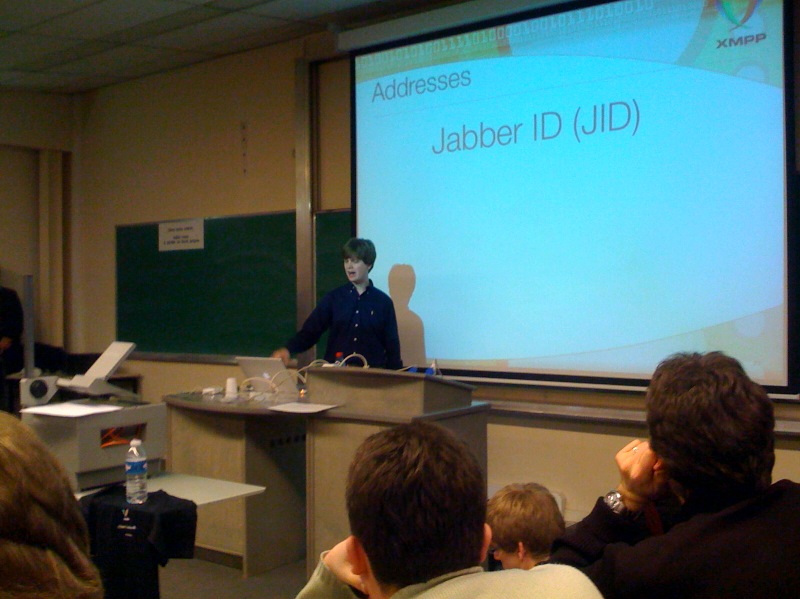
Remko in full action
All in all, FOSDEM hasn’t changed much: it’s an interesting conference, but most of all it’s a way to meet up again with the people you don’t always get to see in real life anymore…
Posted in Computers and stuff | No Comments »
February 23rd, 2009
Shopping on the Dell online shop is absolute horror. Tons of choices without any explanation, like this one:

How am I supposed to know what this is?
What about this one:

Most stupid option, when selecting a LED backlit display, I get this error:
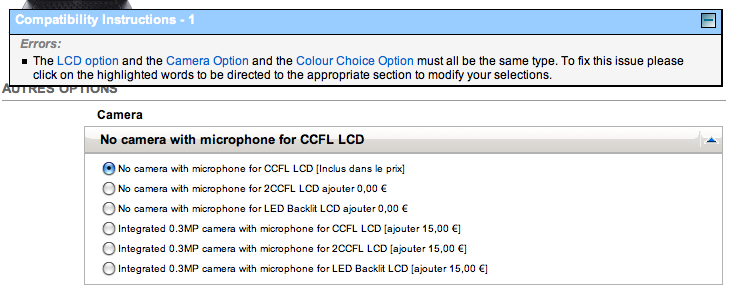
That’s right! I should have chosen the “No camera with microphone for LED backlit display”. Reminds me of the joke about a man that asks for a ham and cheese sandwich without butter to with the clerk responds they only have ham and cheese sandwiches without margarine…
Posted in Uncategorized | No Comments »
January 19th, 2009
I’m finally going to FOSDEM again. A couple of reasons:
- The programme looks really interesting, especially the RoR track, MySQL track and XMPP track.
- It’ll be a nice opportunity to meet up with some geeky friends.
- Some Puppet users want to meet up.
- An is getting more and more interested in IT, so this is a very good way to lure her in all this!

So I hope to see you all at FOSDEM!
Posted in Computers and stuff, Hobbies, Puppet | No Comments »
September 20th, 2008
Posted in Uncategorized | No Comments »
September 16th, 2008
I just wanted to express my sadness with the passing away of Richard Wright and gratitude for all the great music he’s left us with.

Though I really rediscovered Pink Floyd only recently, I have grown to like their music to the point of (unintendedly) annoying my colleagues and friends with their music.
For those that have no idea what I’m talking about: shame on you, go look where the Scissor Sisters, Beasty Boys, Placebo and lots of others got their inspiration.
See you at the great gig in the sky, Mr. Wright!
Posted in Music | 2 Comments »